

转自:https://zhuanlan.zhihu.com/p/100640786
从代码说起:
// 入口文件
// 执行应用并响应
Container::get('app')->run()->send();public function run()
{
try {
// 初始化应用
$this->initialize();
...
}
- bool initialized,定义这个属性的目的是让该方法只能执行一次,即初始化只用执行一次,第二次进来直接就返回了。
- 加载环境变量配置文件时,为什么可以通过$this->env->load 调用到Env类的load方法?
因为当前类App是继承于Container类的,$this->env 那么App类中没有Env属性,就会到父类Container类中去寻找Env属性,父类中没有Env属性就会触发父类的__get()方法 而__get()方法传递的参数就是Env,在__get()方法中调用make()方法创建Env类的实例。
public function initialize()
{
    if ($this->initialized) {
        return;
    }
    $this->initialized = true;
    $this->beginTime   = microtime(true);
    $this->beginMem    = memory_get_usage();
$this->rootPath    = dirname($this->appPath) . DIRECTORY_SEPARATOR; // /Users/liujingxiong/web/tp51/
$this->runtimePath = $this->rootPath . 'runtime' . DIRECTORY_SEPARATOR;
$this->routePath   = $this->rootPath . 'route' . DIRECTORY_SEPARATOR;
$this->configPath  = $this->rootPath . 'config' . DIRECTORY_SEPARATOR;

// 容器对象实例,其实在入口文件中就已经实例化了app,这里再一次调用是为了把上面的属性存入app实例中
static::setInstance($this);
// 绑定一个类实例到容器
$this->instance('app', $this);
// 加载环境变量配置文件
if (is_file($this->rootPath . '.env')) {
    $this->env->load($this->rootPath . '.env');
}
// 获取配置文件后缀名
$this->configExt = $this->env->get('config_ext', '.php');
// 加载惯例配置文件
$this->config->set(include $this->thinkPath . 'convention.php');
// 设置路径环境变量
$this->env->set([
     'think_path'   => $this->thinkPath,
     'root_path'    => $this->rootPath,
     'app_path'     => $this->appPath,
     'config_path'  => $this->configPath,
     'route_path'   => $this->routePath,
     'runtime_path' => $this->runtimePath,
     'extend_path'  => $this->rootPath . 'extend' . DIRECTORY_SEPARATOR,
     'vendor_path'  => $this->rootPath . 'vendor' . DIRECTORY_SEPARATOR,
 ]);
 $this->namespace = $this->env->get('app_namespace', $this->namespace);
 $this->env->set('app_namespace', $this->namespace);
 // 注册应用命名空间 这里就不再赘述,详见类的自动加载
 // $this->appPath 就是应用的目录application
 Loader::addNamespace($this->namespace, $this->appPath);
 // 初始化应用
 $this->init();
 // 开启类名后缀
 $this->suffix = $this->config('app.class_suffix');
 // 应用调试模式
 $this->appDebug = $this->env->get('app_debug', $this->config('app.app_debug'));
 $this->env->set('app_debug', $this->appDebug);
 if (!$this->appDebug) {
     ini_set('display_errors', 'Off');
 } elseif (PHP_SAPI != 'cli') {
     //重新申请一块比较大的buffer
     if (ob_get_level() > 0) {
         $output = ob_get_clean();
     }
     ob_start();
     if (!empty($output)) {
         echo $output;
     }
 }
 // 注册异常处理类 冗余了 在containerConfigUpdate()方法中
 /** @see  App::containerConfigUpdate() */
 if ($this->config('app.exception_handle')) {
     Error::setExceptionHandler($this->config('app.exception_handle'));
 }
 // 注册根命名空间
 if (!empty($this->config('app.root_namespace'))) {
     Loader::addNamespace($this->config('app.root_namespace'));
 }
 // 加载composer autofile文件
 Loader::loadComposerAutoloadFiles();
 // 注册类库别名
 Loader::addClassAlias($this->config->pull('alias'));
 // 数据库配置初始化 这里也冗余了
 /** @see  App::containerConfigUpdate() */
 Db::init($this->config->pull('database'));
 // 设置系统时区
 date_default_timezone_set($this->config('app.default_timezone'));
 // 读取语言包
 $this->loadLangPack();
 // 路由初始化
 $this->routeInit();

}
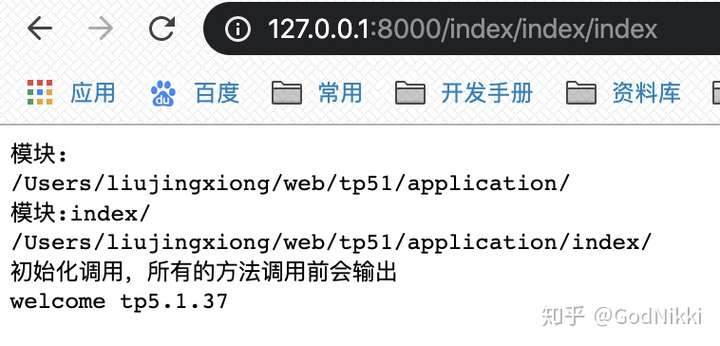
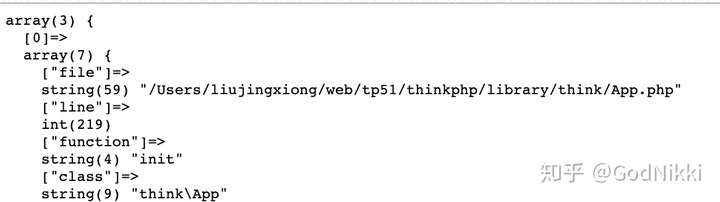
public function init($module = '')
{
    // var_dump(debug_backtrace()); // 回溯追踪函数调用信息
    // 定位模块目录
    $module = $module ? $module . DIRECTORY_SEPARATOR : '';
    $path   = $this->appPath . $module;
    //echo '模块:'. $module . PHP_EOL;
    //echo $path . PHP_EOL;
// 加载初始化文件
if (is_file($path . 'init.php')) {
    include $path . 'init.php';
} elseif (is_file($this->runtimePath . $module . 'init.php')) {
    include $this->runtimePath . $module . 'init.php';
} else {
    // 加载行为扩展文件
    if (is_file($path . 'tags.php')) {
        $tags = include $path . 'tags.php';
        if (is_array($tags)) {
            $this->hook->import($tags);
        }
    }
    // 加载公共文件
    if (is_file($path . 'common.php')) {
        include_once $path . 'common.php';
    }
    if ('' == $module) {
        // 加载系统助手函数
        include $this->thinkPath . 'helper.php';
    }
    // 加载中间件
    if (is_file($path . 'middleware.php')) {
        $middleware = include $path . 'middleware.php';
        if (is_array($middleware)) {
            $this->middleware->import($middleware);
        }
    }
    // 注册服务的容器对象实例
    if (is_file($path . 'provider.php')) {
        $provider = include $path . 'provider.php';
        if (is_array($provider)) {
            $this->bindTo($provider);
        }
    }
    // 自动读取配置文件
    if (is_dir($path . 'config')) {
        $dir = $path . 'config' . DIRECTORY_SEPARATOR;
    } elseif (is_dir($this->configPath . $module)) {
        $dir = $this->configPath . $module;
    }

    $files = isset($dir) ? scandir($dir) : [];
    foreach ($files as $file) {
        if ('.' . pathinfo($file, PATHINFO_EXTENSION) === $this->configExt) {
            $this->config->load($dir . $file, pathinfo($file, PATHINFO_FILENAME)); // 传递的两个参数 一个完整的文件路径  一个文件名
        }
    }
}

$this->setModulePath($path);

if ($module) {
   // 对容器中的对象实例进行配置更新
   $this->containerConfigUpdate($module);
}

}
4.(2) provider.php说明:注册服务的容器对象实例,返回的是一个数组,定义一个类的别名,最终会和Container类的bind属性进行merge,前面在讲自定义容器的时候就已经使用到了,这里再加深一下理解。
4.(3) $this->setModulePath($path)说明:作用是将模块路径配置最终写到环境变量配置中,但是第一次模块是空的,第二次才是定位到真正的模块(index),再次调用$this->setModulePath($path)会进行覆盖,但是这样写不太严谨,放到下面的if中比较合适
if ($module) {
   $this->setModulePath($path);
   // 对容器中的对象实例进行配置更新
   $this->containerConfigUpdate($module);
}
评论 (0)